QR code menu for restaurants: free templates, live in 10 minutes
Turn your menu into a mobile-friendly page with its own QR code. Start from a free template or let AI write it, then change a price in seconds without reprinting anything.
- 15-day free trial
- No credit card
- No app for guests
- QR code included
What a QR code menu is
A QR code menu is a restaurant menu that guests open by scanning a QR code with their phone camera, with no app to install. The menu lives on a web page, and the code on the table points straight to it, so you update the page once and every later scan shows the new menu. Supadrop puts your menu page online about 30 seconds after you drop the file, with a QR code ready to print.
-
Pick a template or ask AI
Download one of the 4 free templates below and replace the dishes and prices, or ask ChatGPT for a mobile-first HTML page of your menu.
-
Drop it on Supadrop
Upload the file and pick an address, such as bella-notte.supadrop.site. The menu is live with HTTPS and unlimited traffic.
-
Print your QR code
Download the code as PNG or copy the SVG for print, then place it on table tents, stickers and your window.
Want the full walkthrough with copy-paste AI prompts? Read the digital restaurant menu guide
4 free restaurant menu templates
Real, mobile-first HTML menus. Download one, replace the dishes and prices, and upload it to Supadrop. No email, no design skills needed.
-
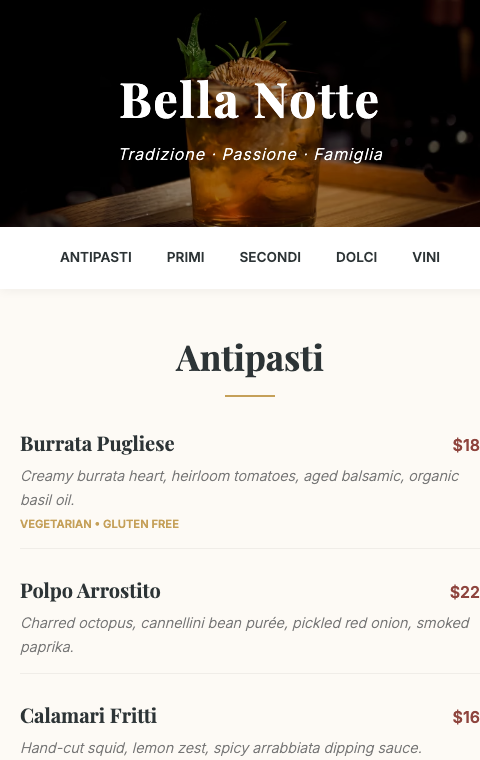
Elegant Italian
Warm cream tones and a Playfair Display serif for trattorias and fine Italian dining.
-
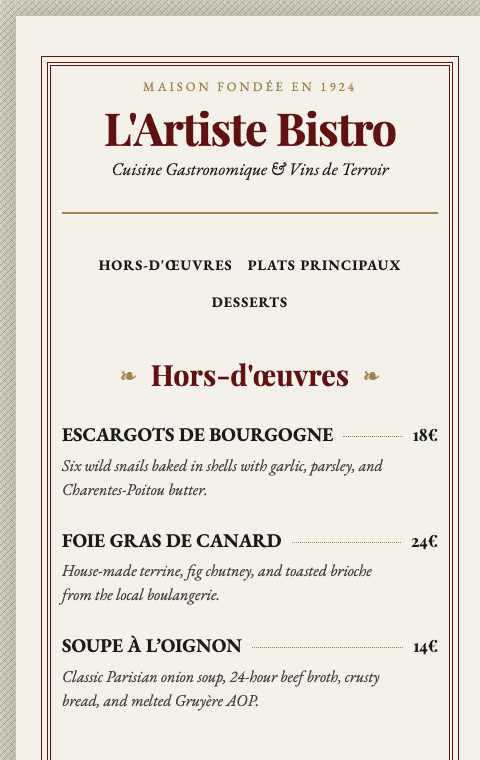
French Bistro
Vintage Parisian feel with dotted price leaders and a 1924 heritage touch.
-
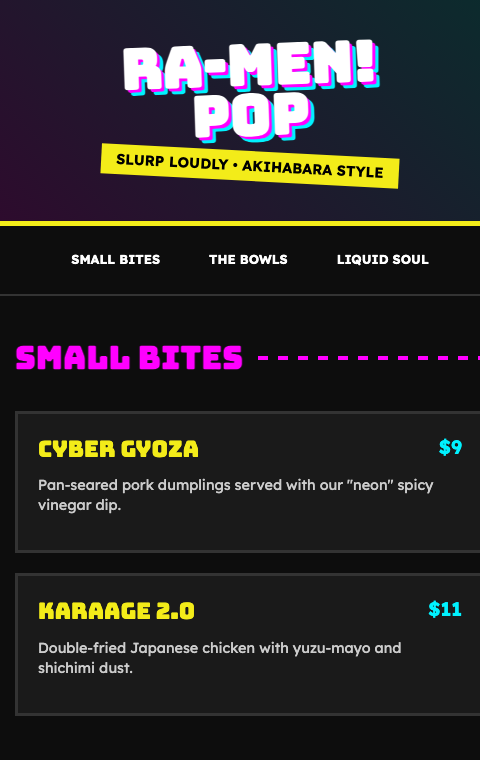
Japanese Ramen Pop
Neon Tokyo energy and bold display type for ramen bars and street kitchens.
-
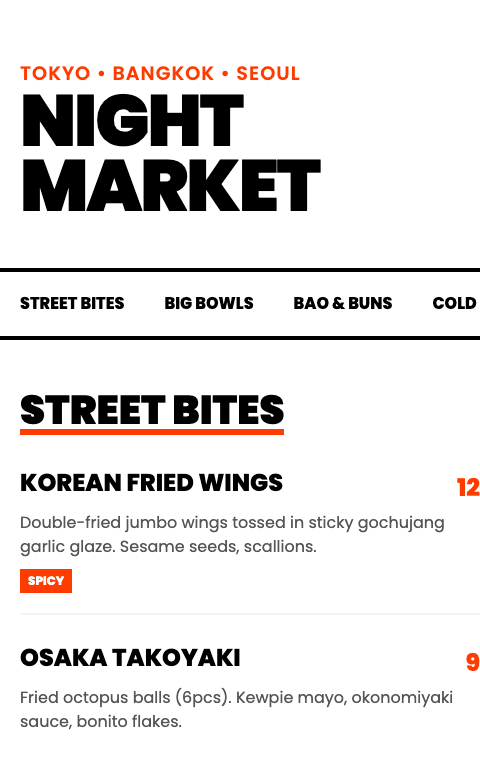
Night Market
High-contrast black and orange for modern street food and Asian fusion.
Free to use for your restaurant. Open the file in any text editor or ask ChatGPT to fill it with your menu, then drop it on Supadrop to get your link and QR code.
QR code generator subscription vs your menu on Supadrop
Most QR menu tools sell a dynamic code that redirects through their servers. Here the code points straight to your menu.
| Comparison point | Dynamic QR code generator | Menu page on Supadrop |
|---|---|---|
| What the code opens | A redirect on the generator's domain | Your menu's own address |
| If you stop paying | The redirect can stop, and every printed code with it | Codes keep working while the page is online |
| Scan limits | Some plans cap scans | Unlimited scans and traffic |
| Menu page included | Often a PDF or a builder page | Your own mobile-first HTML page |
| Your own domain | Depends on the tool and plan | All paid plans |
| Update the menu | Change the link or the file | Upload the new file, same URL and QR code |
| Cost | Monthly subscription | 15-day trial, then from $5/mo billed yearly ($7 month to month) |
Scan caps: see for example Uniqode's restaurant menu FAQ, checked on 2026-10-26. Comparing hosting tools instead? See how Supadrop compares with Tiiny Host, Netlify Drop and others.
Static site hosting pricing
Start with 15 free days, no card. Paid plans from $7 a month.
Free to start
Every account starts with 15 days to try Supadrop, no credit card.
$0 for 15 days
- Included: 1 live site
- Included: 50 MB storage
- Included: Your own subdomain
- Included: Free SSL
- Included: QR code
Nothing is charged when it ends. If you don't pick a plan, your site goes offline and your files are deleted 7 days later.
supa starter
- Included: 2 sites
- Included: 500 MB storage
- Included: Your own subdomain
- Included: Custom domain
- Included: Free SSL
- Included: Unlimited traffic
- Included: QR codes
- Not included: API
- Not included: Email capture
supa pro
- Included: 10 sites
- Included: 5 GB storage
- Included: Your own subdomain
- Included: Custom domain
- Included: Free SSL
- Included: Unlimited traffic
- Included: QR codes
- Included: API
- Included: Email capture
supa large
- Included: 30 sites
- Included: 20 GB storage
- Included: Your own subdomain
- Included: Custom domain
- Included: Free SSL
- Included: Unlimited traffic
- Included: QR codes
- Included: API
- Included: Email capture
Frequently asked questions
How do I set up a QR code for my restaurant menu?
Put your menu on a web page, then point a QR code to that page. With Supadrop, you download one of the 4 free templates (or ask ChatGPT to write the page), replace the dishes and prices, and upload the file. The QR code is created with your menu's link: download it as PNG, or copy the SVG version for print, and put it on your tables.
Can I create a QR code menu for free?
Yes, to start. The templates are free to download, with no email. Supadrop offers a 15-day free trial with no credit card: one live menu, your own subdomain, HTTPS and a QR code. After the trial, plans start at $5 per month billed yearly ($7 month to month).
Do guests need an app to scan the menu?
No. Guests point their phone camera at the code and the menu opens in the browser. Every recent iPhone and Android phone reads QR codes from the camera app.
Will my QR code stop working?
Not while the menu page is online. The code points straight to your menu's address, not to a redirect on someone else's domain. When the trial ends, pick a plan to keep the menu at the same address and the printed codes keep working. We never charge a card you did not enter.
Can I update my menu without reprinting the QR code?
Yes. Edit your file and upload it again to the same site. The URL stays the same, so every guest who scans the code sees the updated menu right away.
Should my menu be a web page or a PDF?
A web page, when you can. It fits the width of the phone, keeps the text large and loads faster, where a PDF keeps the printed layout and makes guests pinch and zoom. If a PDF is all you have today, upload it now: it gets its own link and QR code, and you can replace it with a web page later without changing the code.
What size should I print the QR code?
At least 2.5 to 3 cm (about 1 to 1.2 inches) wide on a table, and 10 cm or more on a window or a poster read from a distance. Print from the SVG version so the code stays sharp, keep dark modules on a light background, and test the printed code with two different phones before printing a batch.
Can I use my own domain?
Yes. With any paid plan you can connect a domain like menu.yourrestaurant.com, with the HTTPS certificate handled automatically.
Can I use this for several restaurant locations?
Yes. Create a separate menu and QR code for each location and manage them all from one Supadrop account. The Starter plan includes 2 sites, Pro includes 10.
Create your QR code menu today
Download a template, drop it on Supadrop, and print your QR code. Your first menu can be live in under ten minutes.
Start Free15-day free trial. No credit card required.
Guides on QR code menus
Short answers to the questions restaurant owners ask before they print a QR code, each with a full guide.
-
How do I make a menu page with ChatGPT?
Give it your current menu as text or a photo, ask for a single mobile-first HTML page, and check every price it writes back before you publish.
Step by step: a digital restaurant menu with ChatGPT -
What should a digital menu include?
Sections in the order guests eat, every price with its currency, dietary labels next to each dish, opening hours and a booking link.
What to put on a digital menu -
Web page or PDF: which reads better on a phone?
A web page fits the screen and keeps the text large. A PDF keeps the printed layout, so guests pinch and zoom to read a price.
Web page or PDF menu, compared -
Static or dynamic QR code?
A static code encodes your menu's address and never expires. A dynamic code goes through the generator's redirect, which can stop when the plan lapses.
Static vs dynamic QR codes, and which ones expire -
I only have a PDF menu. Can it get a QR code?
Yes. Upload the PDF, and it gets its own link and a QR code in about thirty seconds.
How to create a QR code for a PDF -
Can the menu use my restaurant's domain?
Yes. Point a DNS record at the host and the menu answers on menu.yourrestaurant.com, with HTTPS.
How to add a custom domain to a static site